How to Locate Invitation Code

Follow these simple steps to find your Dino Network agency invitation directly inside TikTok.
Animated GIF

Where Is the Invitation Code?

TikTok sends agency invitations directly inside the app.
There is no external email or third-party system involved.
Always check your TikTok app notifications carefully.
TikTok sends agency invitations directly inside the app. There is no external email or third-party system involved. Always check your TikTok app notifications carefully.
Open TikTok App
Log in to your TikTok account using the official TikTok app. Make sure the app is updated to the latest version.
Go to LIVE Center
Tap on Profile → ☰ Menu → Creator Tools → LIVE Center to access agency notifications.
Find Agency Invitation
Look for an invitation from Dino Network. This invitation contains your official agency link.

What Can Delay Your Application?

Understanding common pitfalls can help ensure a smooth application process.
You take too long to
respond

Keep your engagement timely to maintain audience interest and maximize your reach on TikTok.

You've got multiple TikTok accounts linked

Using several accounts simultaneously can affect performance and analytics. Make sure to manage them carefully to avoid conflicts or restrictions.

You violate TikTok community guidelines

Your account has content or activity that doesn’t follow TikTok’s rules. Review the community guidelines and remove or correct any content that may be in violation to avoid penalties or restrictions.

Suspicious account activity (e.g. fake followers, etc.)

TikTok has detected unusual behavior on your account, such as rapid following/unfollowing, spammy content, or fake followers. This can limit your reach or result in restrictions. Focus on authentic engagement and avoid automated tools or spammy practices.
You've already applied through another agency

Our system shows that your TikTok account is currently linked to another agency. Each account can only be managed by one agency at a time. To proceed, you may need to unlink your account from the previous agency before applying again.

Your TikTok account is private or restricted

To join our agency, your TikTok account must be public and in good standing. Please make your account public and ensure it is not restricted before applying.

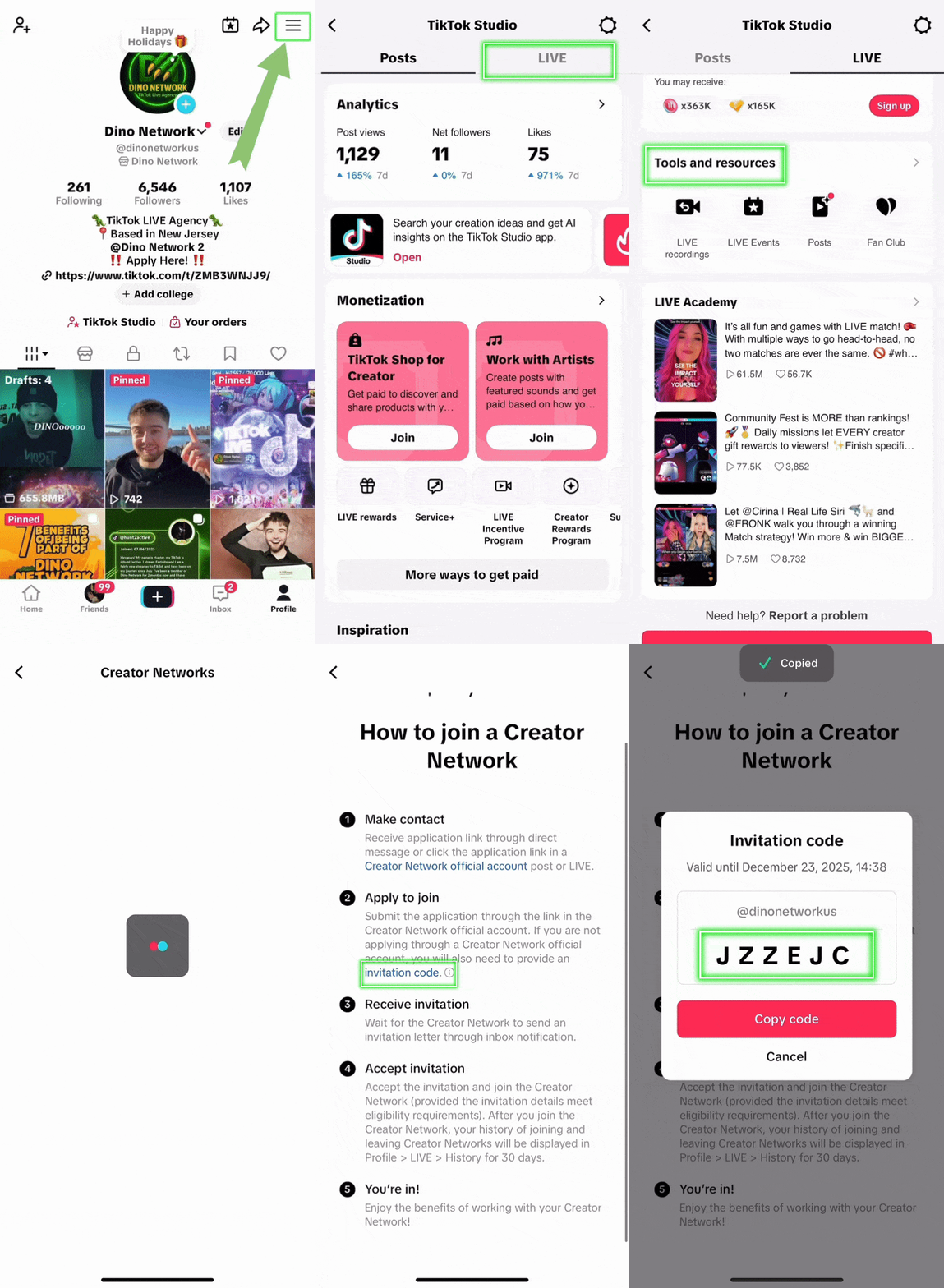
Follow these steps in your Tiktok app

Find Your Invitation Code

Just 7 simple steps and you'll have your code in less than 10 seconds!
Go to your TikTok Profile
Open TikTok and tap on your profile picture in the bottom right corner
Tap the menu icon
Look for the hamburger menu in the top right or the little arrow
Select TikTok Studio
Find and tap on 'TikTok Studio' from the menu options
Tap LIVE Center
Navigate to the LIVE Center section in TikTok Studio
Go to Join Creator Network
Look for and select Join Creator Network" option
Tap How to Join
Click on the 'How to Join' button or link

Important Note

Look for an invitation from Dino Network. This invitation
contains your official agency link.
Look for an invitation from Dino Network. This invitation contains your official agency link.

Can't Find Your Invitation?

If you’re unable to locate your invitation, our support team is ready to assist you.

Sorry, but you do not qualify for our LIVE Agency

We are only accepting creators based in the United States or Canada

Back